
Overview
Background
Why we focused on new users’ first-month learning volume
The department’s data science (DS) team ran a series of correlation analyses on the renewal rate, our core metric. Among the factors they analyzed, whether new users’ first-month course completions fell within a certain range was one of the most strongly correlated with a higher renewal rate. Although the correlation was only moderate, this factor was the most promising starting point available to us at the time. So we decided to focus on one problem: new users’ low learning volume (the number of courses they completed) in their first month.
What we observed
From the data, we observed two patterns:
- Low early learning volume: In their first month of subscription, new users completed relatively few Courses on average, below the lower bound of the range the DS team had identified.
- Low adoption of Learning Paths: The curriculum team had invested heavily in creating Learning Paths, but fewer than 20% of new users enrolled in one on their own. There was a clear gap between the resources invested and how much the paths were actually used.
Hypothesis
To understand these patterns, the PO and UX Researcher interviewed several users who matched them, and the team synthesized their backgrounds and mindsets into a persona:
Based on this persona, we hypothesized: New users’ low learning volume wasn’t due to a lack of motivation, but to not knowing what to learn or how to learn it when faced with a vast course library.
Solution
How we decided
- In early discussions, we thought a course recommendation algorithm might help users who didn’t know what to learn, but it still wouldn’t solve the problem of how to learn.
- So the PO proposed building the solution around the Learning Paths the curriculum team had already created. Building on that, the team decided to:
- Make choices easier: Turn “finding the right course among 4,400+ courses” into “choosing among a few broad themes,” reducing users’ decision fatigue.
- Decide once, learn in depth: Users make a single decision and get a set of learning content that the curriculum team has structured and sequenced. This lets them focus on learning itself, instead of having to decide which course to take each time they log in.
Final solution: creating a personalized learning plan
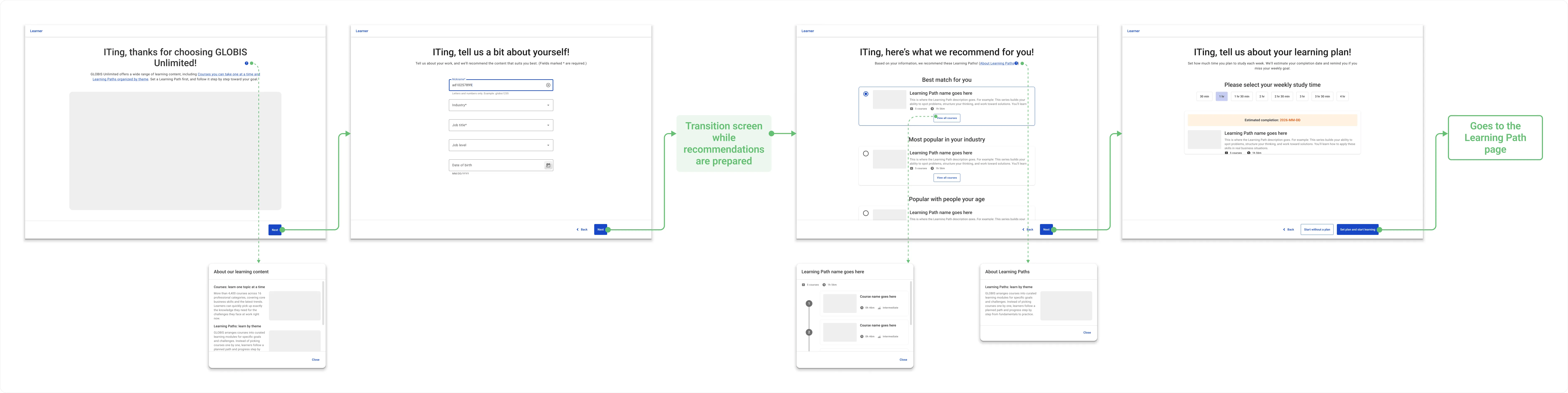
We designed an onboarding flow built around Learning Paths:
- Guiding users to set a learning goal: Before new users first enter the course library, the flow guides them to choose the Learning Path that suits them best.
- Setting up a personal plan: Beyond choosing content, the flow helps users set up a concrete learning plan, giving them a clear learning pace and a sense of purpose.
Key design decisions
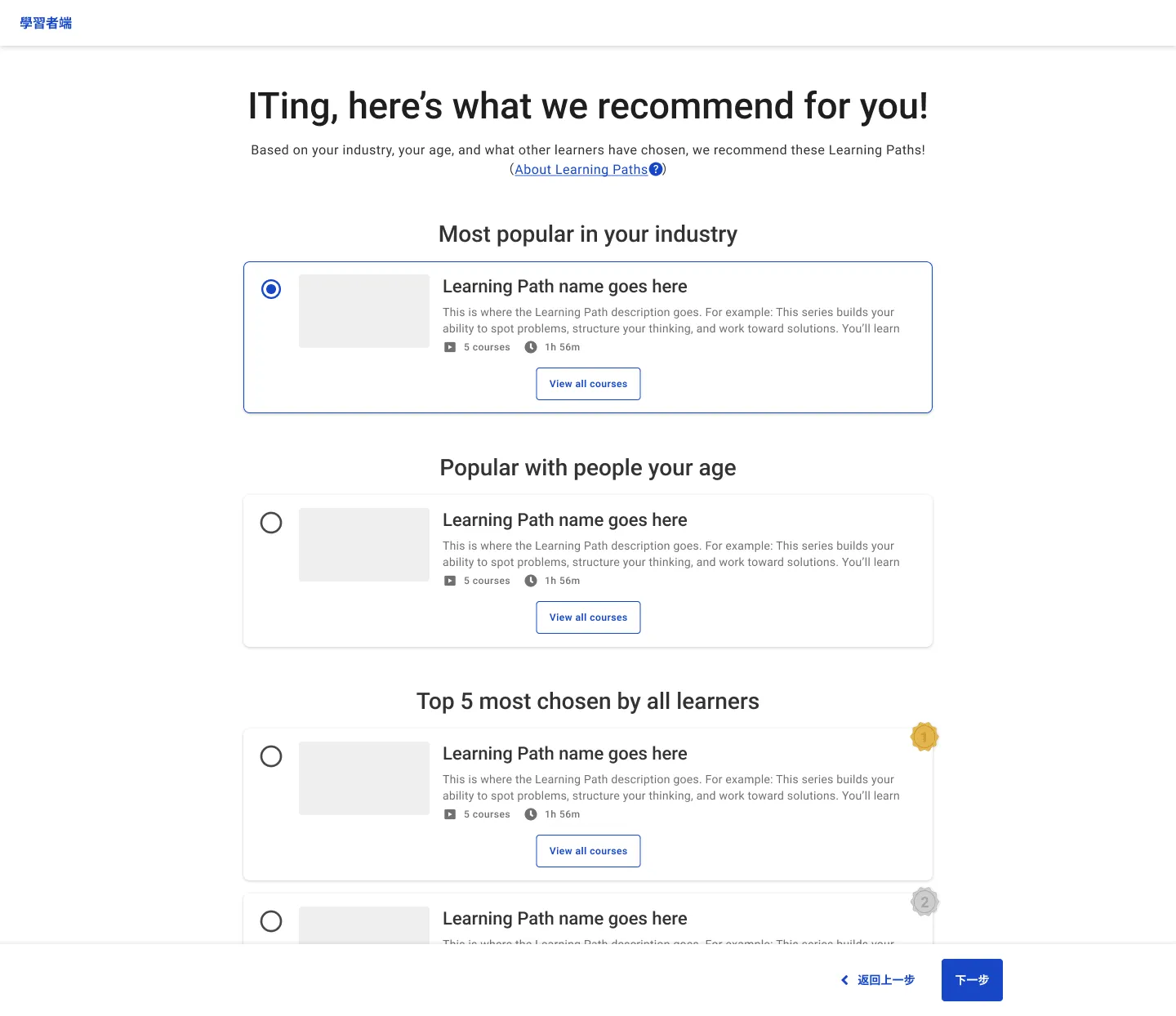
- Proposing an alternative way to recommend Learning Paths when a “best match” wasn’t possible
The initial proposal for the recommendation page showed “Best match for you” at the top. But this wasn’t feasible at the time: the engineering team had no experience developing content recommendations, and claiming that any content was the best match for a particular user would have required review by the curriculum team, which didn’t have the bandwidth at the time.
So I proposed an alternative: based on the attributes users had entered in the previous step (industry and age), the page would recommend Learning Paths that were “Most popular in your industry” and “Popular with people your age,” plus the five most popular Learning Paths across GLOBIS Unlimited. After launch, users most often enrolled in Learning Paths matched to their own industry.
- Moving the weekly unit from copy to interaction
In usability testing, 60% of participants misread “weekly study time” as “daily.” They didn’t read section headings word for word; when they saw a row of duration options, they instinctively took them to mean time per day. So I split out “How many days a week will you study?” as its own question that users had to answer themselves and placed it before “How long will each session be?” This made the weekly time frame a step users couldn’t skip, and in the retest, the misunderstanding no longer occurred. For details, see Designing usability tests around comprehension to catch designs that are easy to use but misunderstood.
- Leading with the core value on a welcome page
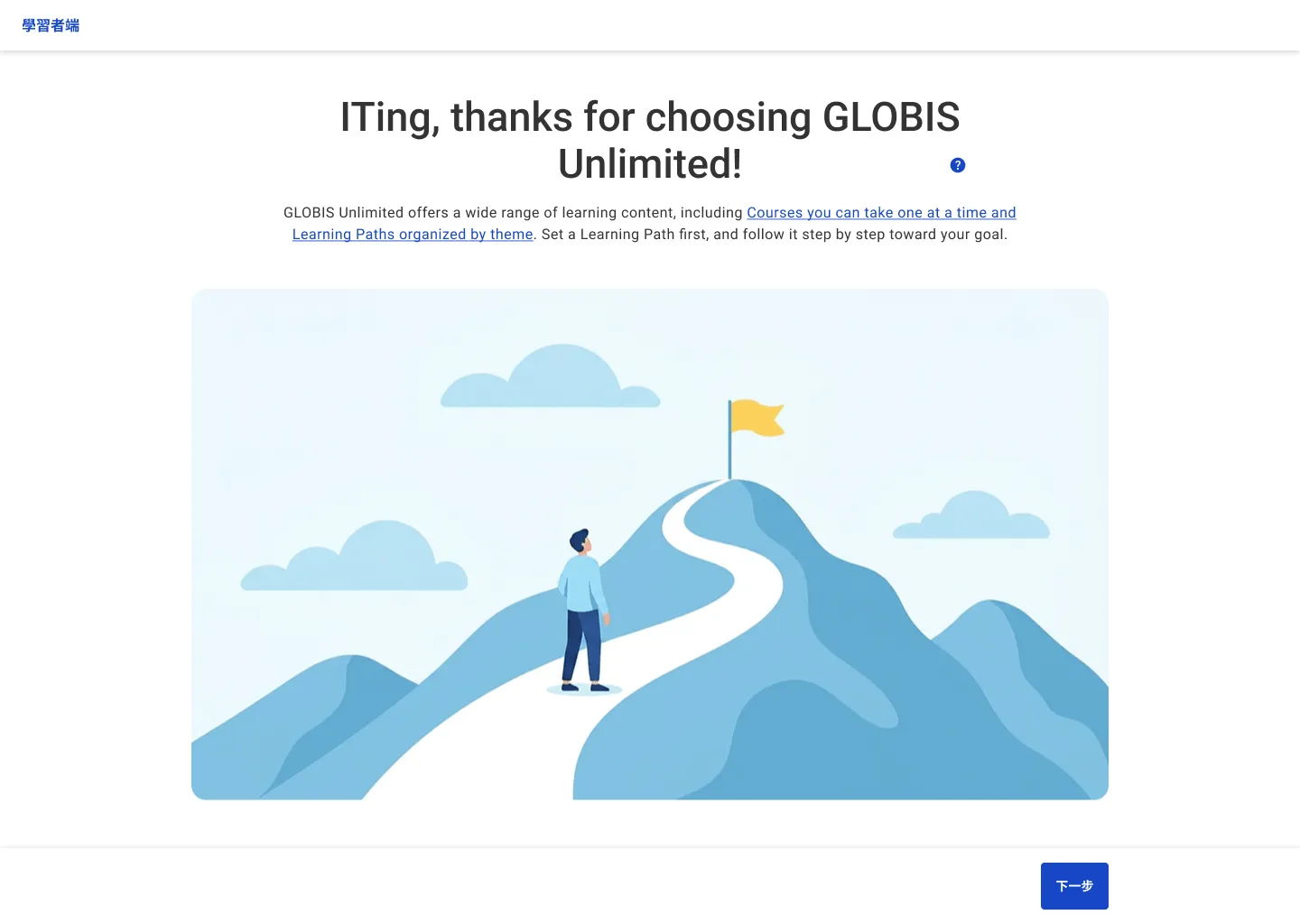
I proposed adding a welcome page as the first onboarding screen. In my competitive analysis (covering direct competitors such as Coursera and Udemy, plus products like Meetup, Spotify, and Instagram for inspiration), I found that most products’ onboarding included a welcome page, mainly to communicate the product’s core value. So on the first page, I told users directly: “Set a Learning Path first, and follow it step by step toward your goal.” I also drew an illustration for this page, a path leading up a mountain to a flag at the summit, to help convey this value.
- Using UX writing to build rapport and explain why we ask
The onboarding flow asked users to enter details such as their industry and job function. To keep it from feeling like a cold form, I framed the request as “we’d like to get to know you better” and explained that the information would help us recommend more suitable learning content. This approach also drew on a finding from the competitive analysis: when collecting personal information, most products explained why or offered users an incentive. The heading also addressed users by name (for example, “ITing, tell us a bit about yourself!”) to make the experience feel more personal.
Design process
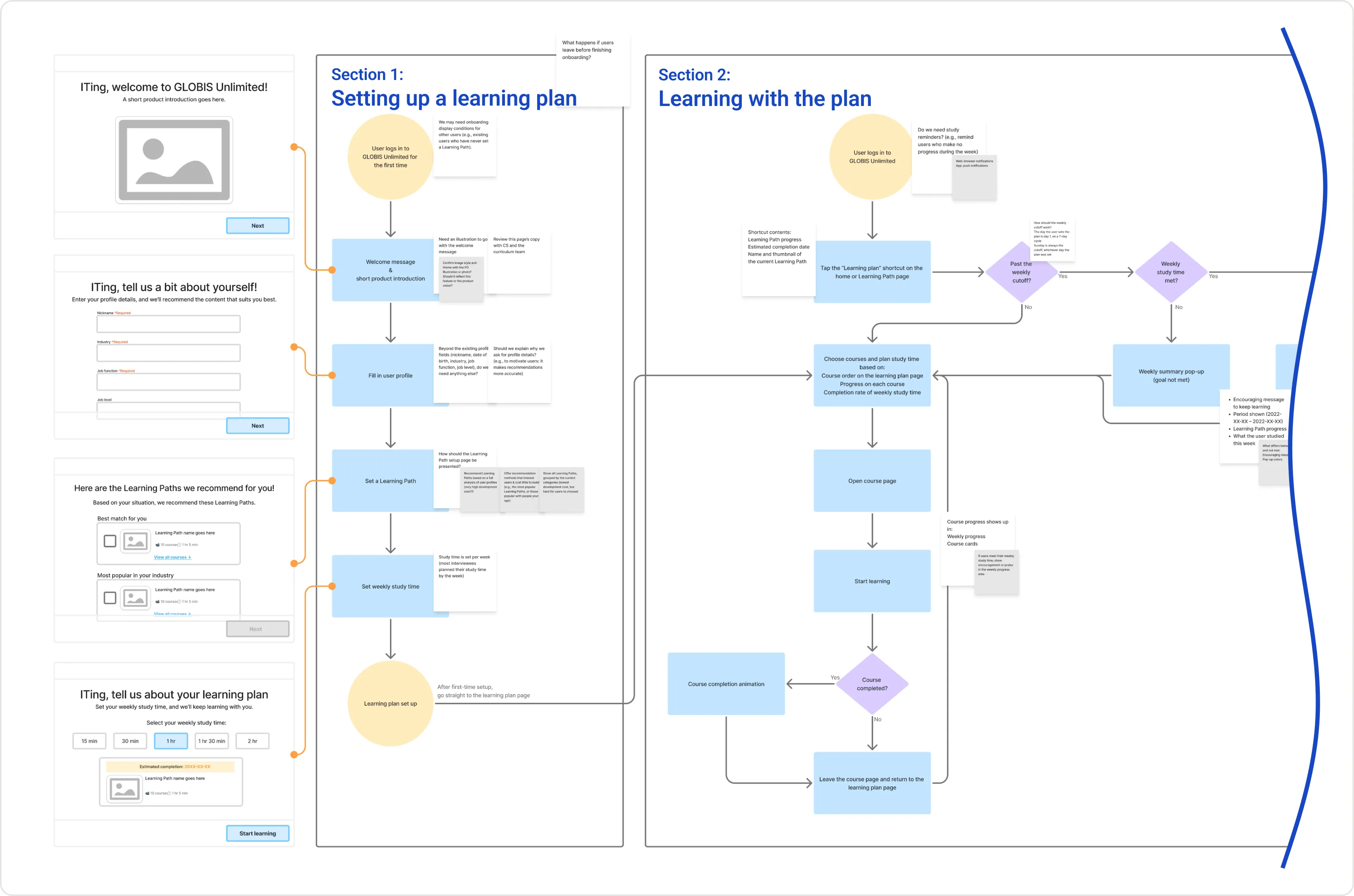
I started with a flowchart and wireframes covering a range of user scenarios. I then held multiple design reviews with the engineers (FE/BE/iOS) to balance the design intent against the development schedule, and produced a UI flow with clear effort estimates. Next, I created high-fidelity prototypes, ran usability tests, and iterated. Finally, during development, I promptly handled unanticipated edge cases and used Design QA to make sure the implementation matched the design. The feature launched on both Web and iOS.
Outcomes
| Area | Outcome |
|---|---|
| Increased early learning volume ⤴️ | In the first three months after launch, new users’ average first-month course completions stayed consistently above the baseline from the six months before launch, an increase of roughly 100%. The increase appeared in all three monthly cohorts, so it was not a one-month spike. |
How we measured the outcome
Because onboarding is a flow every new user goes through, splitting off a control group for an A/B test wasn’t a good fit. So, early in the project, we agreed with the DS team to evaluate the outcome with a before-and-after comparison. To reduce noise, we defined the baseline period (before) as the six months before launch and the observation period (after) as the three months after launch. Each cohort consisted of the new users who subscribed in a given month, and we averaged the number of courses each of them completed within 30 days of subscribing.
A broader look at the outcome: the gap between the proxy metric we tracked and the business metric the department hoped to improve
After launch, the proxy metric of new users’ first-month learning volume did increase. However, the DS team’s analysis found no clear correlation between this feature and the department’s core metric, the renewal rate.
This result matched what we had expected at the start of the project. First-month course completions were among the factors most strongly correlated with the renewal rate at the time, but the correlation was only moderate. So from the start, we didn’t expect a single feature to move the renewal rate.
What happened next
As our later qualitative research progressed, we revised our original hypothesis: these users’ lack of progress wasn’t only about not knowing what to learn. More fundamentally, their anxiety wasn’t urgent, so they lacked enough motivation to learn and struggled to find a direction for their learning. These findings also became one of the inputs for the department’s later decision to adjust its investment in individual users.