Overview
For its 30th anniversary, the company went through its first rebrand. As Design Lead for the digital product side, my first task was to lead the designers in aligning the company’s digital product, GLOBIS Unlimited, with the new brand identity.
For the digital product, this rebrand focused on refreshing the brand colors (typography and component sizes continued to follow each OS’s native guidelines). The brand team delivered only two brand colors to the product team: a primary blue and a secondary orange. For a product spanning four platforms, however, two colors were not enough to cover every UI component in a complex system. The project started from one question: how to derive from these two colors a color system that every platform could use. It also became an opportunity for us to re-examine the existing design system.
The restructuring covered the component libraries of four platforms in the product ecosystem: the learner-facing Web, iOS, and Android apps, and the web-based corporate HR admin dashboard. The process was almost identical for the learner side and the corporate side, so this case study focuses on the learner side.
Defining the project goals and scope
Step 01: Assessing the current state and the project’s feasibility
After receiving the brand team’s request, I led the designers in reviewing the current state of the four component libraries and taking inventory of the colors defined in them. In the process, we found several design debt issues that had to be resolved before the project could proceed:
- No single source of truth for color definitions
The four component libraries were independent of one another, and the brand colors were scattered across them. After years of iteration, the color definitions had diverged. Even the same Primary and Secondary color families had different hex values and a different number of steps (ranging from three to five) in each library. - No semantic layer or usage guidelines for colors
The system didn’t define the proportions or usage logic of colors. As a result, cross-platform design relied on frequent communication between designers to maintain visual consistency, and small differences in color usage were unavoidable. - No unified naming for color definitions
The color systems weren’t carefully planned from the start; they grew bit by bit in the hands of different designers. Each platform’s color names were independent of the others and of the names used in code. As a result, designers working across platforms had to switch contexts frequently, which made mistakes more likely and added to their cognitive load.
Step 02: Negotiating a larger scope, from color replacement to system restructuring
After the inventory, the designers realized that if we settled for a surface-level color replacement within each separate system, it would be hard to fix the visual inconsistencies, and the next brand refresh would cost just as much time and effort again.
So I negotiated with each product team’s product owner (PO) and Scrum Master. My case was that a short-term investment in the system would pay off in more efficient cross-platform maintenance. The company already had a program that lets employees spend up to 20% of their working time on other teams’ or departments’ projects. Through it, I negotiated for capacity so that each team’s designers could work on restructuring the color system.
In the quarter the brand team first approached me, the designers had already begun initial discussions and planning; the project was formally approved and given capacity the following quarter.
Step 03: Setting two-track goals and defining what we won’t do
The brand identity update for the digital products had to be completed. Within that constraint, to balance building a system for the future against avoiding scope creep, the designers and I defined two-track goals together and shared clear delivery criteria with the teams we worked with:
- 🎯 Primary goal: Ensure the cross-platform digital products reflect the new brand identity and deliver a consistent brand experience.
- 🛠️ Secondary goal: Without affecting the primary goal, carry out the minimum restructuring necessary to achieve (1) a single source for color definitions, (2) consistent use of color across the digital products, and (3) lower maintenance and communication costs on the design side.
At the same time, we clearly defined what we would not do this time:
- No semantic architecture on the engineering side. After discussion among the designers, POs, and engineers, the engineering side decided on minimal changes: updating only the hex values in the existing Color Library.
What we built
Restructuring the component library architecture to create a single source of truth for color on the design side
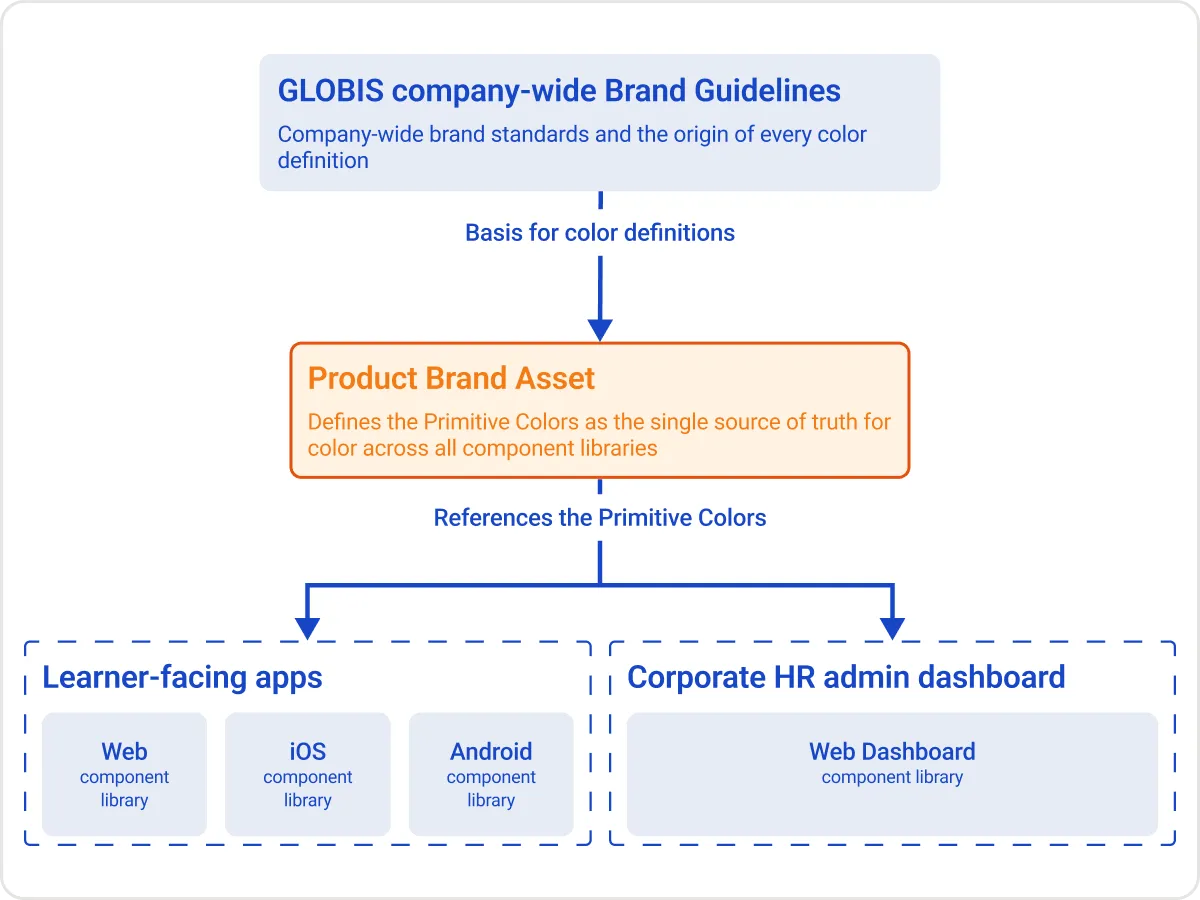
Above the four component libraries, we created the Product Brand Asset library and defined the Primitive Colors in it, providing a single source for the color definitions of every component library. The Semantic Colors in each platform’s component library all reference this source. This fixed the root cause of the old problem: color definitions scattered across platform libraries and drifting apart between platforms.
Primitive Colors come from two sources:
- First, the brand colors, blue and orange, were expanded into full color scales from the values the brand team provided, following Material Design’s approach to generating palettes.
- Second, non-brand colors such as Mono weren’t given new values. Instead, we unified the number of steps and the hex values of each platform’s existing scales, so the four component libraries aligned at this layer first.
Primitive Colors exist only in the Product Brand Asset and are referenced only by the platform component libraries. Project design files reference only the component library for their platform, so designers never use Primitives directly in their day-to-day work.
On the engineering side, each platform already used names similar to our Primitives (such as blue_10 to blue_100), so this update only required replacing each color’s hex value. At the Primitive layer, design and engineering definitions match. In code, however, each platform still maintains its own Color Library, so the cross-platform single source exists only on the design side.
Building the semantic color system
The structure of the system
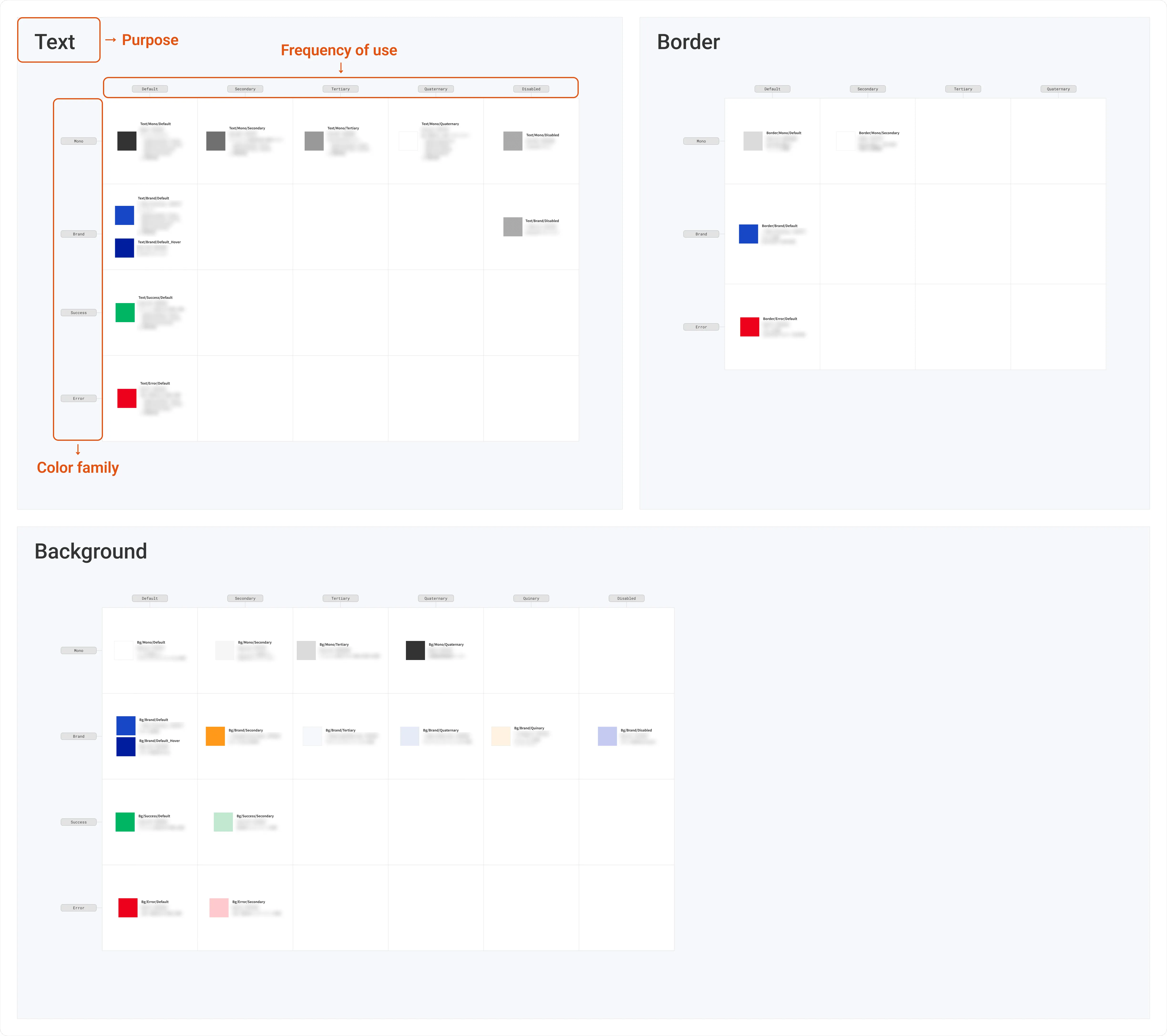
We organized Semantic Colors along three dimensions 👇
- Purpose
- Colors are grouped into three categories by where they’re used: Text, Background, and Border. Figma’s variable scoping limits where each color can be applied based on its purpose, so designers can pick colors with less effort and are less likely to misuse them.
- Color family
- In addition to Mono and Brand, we defined Success and Error color families. The green for success and the red for error had been treated as scattered “special colors” outside any semantic structure; this time we brought them into a unified semantic naming structure.
- Frequency of use
- Colors within the same semantic group are ranked from most to least frequently used in the existing system (Default, Secondary, Tertiary, and so on). Frequency of use here doesn’t mean screen area. The primary blue, for example, is used often but only on key components such as buttons, so it takes up little of the screen.
- We chose frequency of use as the third dimension because the premise of this project was replacement, not rebuilding from scratch: every old color had to find a matching place in the new system. Ordering by frequency of use mapped the most-used old colors to the Default colors, ensuring the system’s visual center of gravity wouldn’t shift after the replacement.
- This dimension also made explicit how frequently each color was used relative to the others, which had existed only as an unspoken understanding among designers. A color’s frequency of use became a definite position in the table, so relationships that couldn’t be verified before became visible and open to discussion.
- Colors within the same semantic group are ranked from most to least frequently used in the existing system (Default, Secondary, Tertiary, and so on). Frequency of use here doesn’t mean screen area. The primary blue, for example, is used often but only on key components such as buttons, so it takes up little of the screen.
Why these three dimensions, in this order?
The other designers and I jointly decided on these three dimensions and their order in meetings I facilitated. There, each of us built a trial version of the color Variables in Figma using a different combination and order of dimensions (for example, Text/Brand/Mono and Brand/Text/Mono). Comparing them hands-on, we found that the order directly affected how efficiently designers could find the right color for a component.
The hierarchy of dimensions directly shapes how designers work: when picking a color in Figma, the top-level dimension is the first option they see. So we ordered the dimensions by the actual sequence of decisions designers make when applying color to a component: first where the color is used (purpose), then which meaning it carries (color family), and finally its frequency of use.
Putting the structure to work
With these dimensions in place, we built a matrix with purpose, color family, and frequency of use as its axes. The matrix served as both an inventory tool and a replacement tool: we placed each existing color in the table, confirmed its position in the system, and then chose a matching new color for each old one. The matrix showed at a glance how many colors were scattered across the system and how they related, so designers could compare them directly.
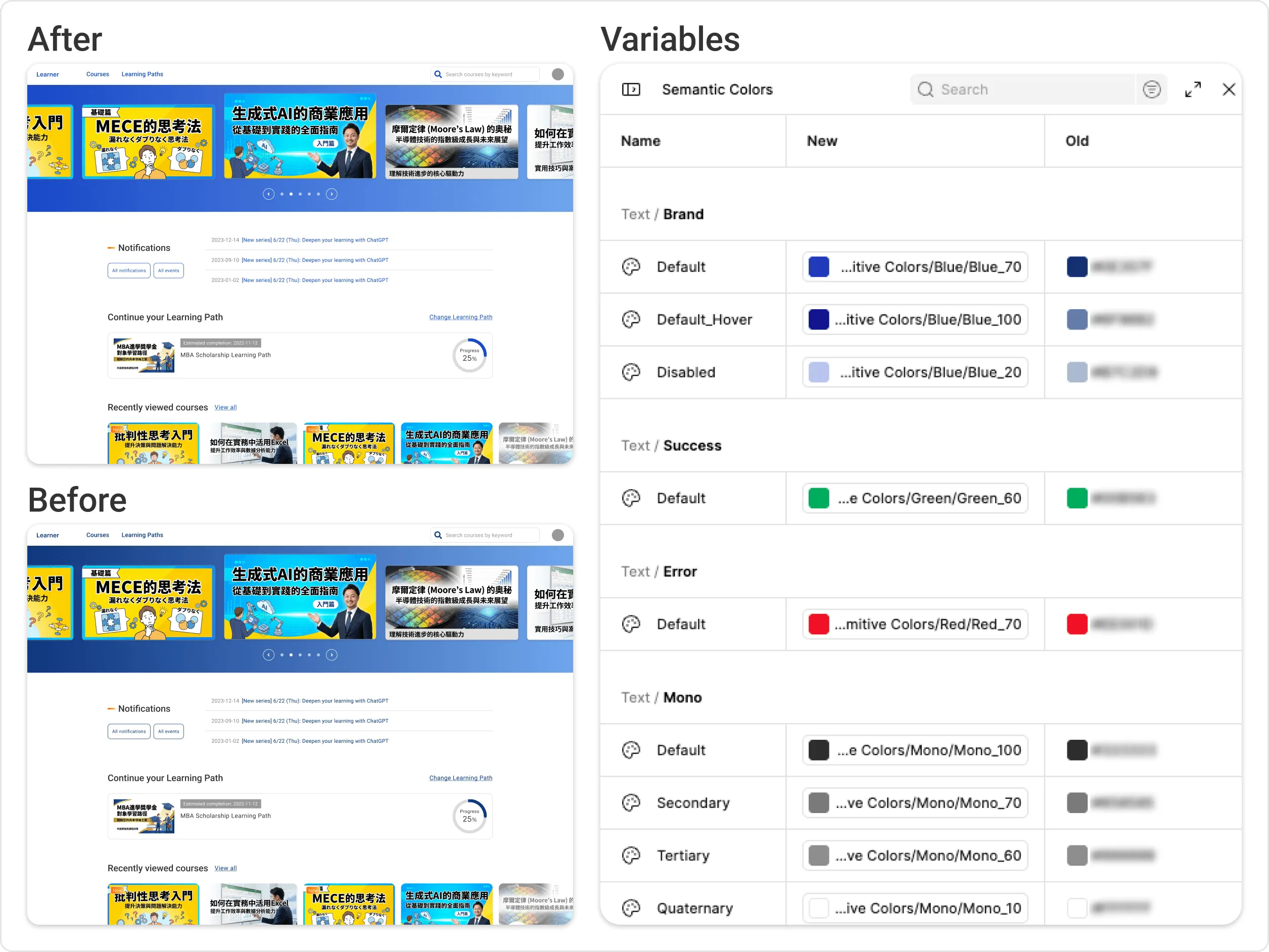
For the color replacement, the designers for each platform first picked representative screens that covered every design pattern in the system, and used Figma Variable Modes to switch those screens between the old and new color schemes with one click. Then all the designers met to review every platform’s results together, checking each other’s screens for colors that needed adjustment.
Using representative screens instead of every screen let us cover every design pattern in the system with limited capacity, and having designers cross-review each other’s work kept the replacement logic consistent across all four platforms.
Outcomes
| Area | Outcome |
|---|---|
| A consistent brand experience across platforms | All four platforms reference the same set of Primitive Colors. The same brand color family no longer has different hex values and scale lengths on different platforms, and the new brand identity is presented consistently on all four platforms. |
| Maintenance cost of the color system | A change to a color definition only needs to be made once, in the Product Brand Asset, to sync across all four component libraries. Before, it had to be made separately in four independent libraries, and changes were easy to miss. |
| Effort and communication cost of choosing colors | Instead of relying on experience and then checking with other platforms’ designers case by case, designers now choose from the matrix of purpose, color family, and frequency of use. They no longer need to confirm individual colors back and forth across platforms. |
| Extending the system’s reach | Because the product had directly adopted the default styles of a third-party frontend framework, it contained undefined orphan colors (such as in toast messages). After the color system update, these colors could finally be brought into the system logically. As a result, the success and error colors users see in toast messages are now consistent with the rest of the product. |
How I assessed these outcomes
I didn’t measure these outcomes quantitatively. Instead, I judged them from how the designers worked day to day:
- From how designers work
The matrix itself has been turned into Figma Variables, so the dropdown designers pick colors from follows the same structure; the rules are built into the tool. Primitive Colors aren’t available to project design files, and scoping limits which properties each color can be applied to.
For designers, this brought two concrete changes. First, working across platforms no longer requires learning four different color systems, which reduces the cost of switching contexts. Second, instead of checking how other platforms used a color while picking one, designers now locate it within one shared system.
That said, this mechanism guarantees only that designers won’t use colors outside the system or apply a text color to a background. Deciding which tier a color belongs to is harder: because the third dimension is based on how often existing colors were used, there is still room for ambiguity with new components.
- From what the team did
The example under “Extending the system’s reach” in the table above is, to me, the clearest sign that the team had internalized this system. The designers had long known that the toast message colors sat outside the system but had never had the bandwidth to deal with them. After the color system update, they proposed a fix on their own and negotiated to have it added as a product backlog item (PBI) with a slot in the development schedule, and the fix shipped. I didn’t ask for this, and it required real development resources. To me, it showed that the designers had started to treat colors outside the system as something that should be brought into it.
Beyond design: the scope on the engineering side
On the engineering side, this project took a minimal-change approach of updating color values in the existing Color Library, so the semantic color architecture was implemented mainly on the design side. This was the scope we agreed on with the POs and engineers at the start of the project. At our team’s size, paying down this kind of technical debt was always going to be hard to fit into the regular development cycle, and it would not become a priority unless the organization’s size or business focus changed.
So on the engineering side, the color system stops at the level of Primitive Colors. For me, this was also an exercise in holding the line on scope—after all, most designers have a bit of a perfectionist streak.